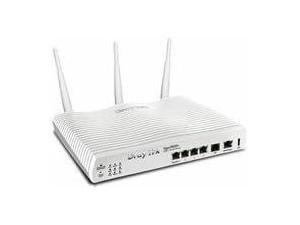
DrayTek Vigor 2830n Triple-WAN Wireless-N ADSL2+ Modem Router overview
Product Overview
The Vigor2830 is the latest generation of our flagship ADSL router/firewall range, winner of the PC Pro wireless router award for three years in a row. This latest series includes support for professional features such as VLAN tagging, Gigabit Ethernet and WiFi (ess models). The Vigor 2830's secondary WAN interface can be connected to other modems now or later (e.g. a second ADSL, BT Infinity or cable modem etc.). See below for a comparison chart of the Vigor 2830 vs. Vigor 2820 series. Packed with features, the Vigor 2830 offers truly comprehensive ADSL connetivity and security. Compatible with all variants of ADSL (including ADSLMax, ADSL2+ and Annex M) the Vigor 2830 can also be used for cable-modem and leased line applications using its additional gigabit ethernet WAN port. A four port Gigabit switch on the LAN side provides high speed connectivity for your server or other local PCs, for the highest speed local data transfer. Security features include content filtering, web application controls and new object based firewall management system.
Product Features
Robust & Comprehensive Firewall
Security is always taken seriously with DrayTek routers. The firewall protects against attacks including DoS (Denial of Service) attacks, IP-based attacks and access by unauthorised remote systems. Wireless, Ethernet and VPN are also protected by various protection systems. The latest ('Version 3') DrayTek object-based firewall allows even more setup flexibility than ever, enabling you to create combinations of users, rules and restrictions to suit multi-departmental organisations. The Vigor 2830 now also allows selective direction firewall rules of LAN to WAN, WAN to LAN or LAN to VPN. In addition, QoS (Quality of Service Assurance) can now be selectively applied to specific users.
IPv6 - Next Generation Internet Routing
The Vigor 2830 now supports IPv6 - the successor to the current IPv4 addressing system that has been used since the Internet was first created. IPv4 address space is full up and IPv6 allows for much more efficient routing and a larger address space. IPv6 is supported both from your own ISP, but if your ISP does not (yet) support IPv6, the Vigor 2850 also supports IPv6 broker/tunnel services to provide IPv6 accss using either TSPC or AICCU via 3rd party IPv6 providers.
802.1q Tagged, Wireless & Port Based VLAN
The Vigor2830 features a hugely flexible VLAN system. In its simplest form, each of the four Gigabit LAN ports can be isolated from each other, for example to feed four different companies or departments but keeping their local traffic completely separated. For more sophisticated scenarios, the Vigor 2830 includes tagged VLANs (802.1q) whereby data is marked with a VLAN identifier. This identifier can be read by an onward Ethernet switch and directed to specific ports or just passed to the LAN for specific VLAN clients to pick up; priorities can also be applied for LAN-side QoS. The VLANs can each be tied into each of the different IP subnets that the router may also be operating, to provide even more isolation. On the Wireless-equipped models (Vigor2830n / 2830Vn) each of the wireless SSIDs can also be grouped within one of the VLANs.
User Management/Authentication
The Vigor 2830 has built-in user management which allows you to provide internet access to users based on their own unique login (stored in the router, or on an external Radius server). Accounts can be restricted by schedules or maximum usage times but also any other aspect of the firewall or content filtering can be applied on a user-by-user basis. For example, a sales department might not be allowed access to social networking sites except at lunch time, or in a school, teachers and staff have more access permitted than pupils. This works with Wireless (WiFi) clients too so is ideal for guest or temporary access as users can be isolated from the rest of the company LAN.
Reliable and High-Performance WiFi
The Vigor 2830 Series 'n' models feature 802.11n wireless LAN specification and has been certified by the WiFi alliance for cross compatibility and WiFi compliance (including WPA/WPA2 and WMM). The Vigor2830n and Vn models includes a hardware co-processor for WiFi which can provide increased wireless LAN throughput and efficiency. 802.11n provides a total wireless bandwidth of up to 300Mb/s using packet aggregation and channel bonding (that total bandwidth is shared by all clients for both send and receive). Actual data throughput depends on your own environment (factors such as obstructions, number of hosts and distance all make a significant difference), but actual real-world transfer speeds of up to 100Mb/s are achievable. In addition, 802.11n provides greater coverage and resilience to interference compared to previous wireless standards thanks to the MIMO technology and the Vigor's triple-antennae diversity arrangement. This offset arrangement of aerials provides offset paths between hosts so that interference can be overcome.
Wireless Security
The Vigor 2830 Series provides several independent levels of security including encryption (up to WPA2), authentication (802.11x) and methods such as MAC address locking and DHCP fixing to restrict access to authorised users only. The Web interface lets you see how many and which clients are currently connected as well as their current bandwidth usage. An 'instant' block lets you disconnect a wireless user temporarily in case of query. The Wireless VLAN facility allows you to isolate wireless clients from each other or from the 'wired' LAN. The Vigor2830 wireless versions also allow guest access with password protection so that visitors can use your WiFi access, but only with a password which you set for them. When the user connects to your wireless LAN, they are firstly presented with your login screen before any Internet access is permitted. This is in addition to any encryption system you have running. The Multiple SSID features enables you to have up to four distinct or common virtual wireless access points. For example, you could have one for company usage, with access to your company LAN and another for public access which allows internet surfing only. Setting up wireless security is made easier thanks to the WPS feature (WiFi protected setup) whereby your client PC can get it's security keys by pressing a button on the front of the router.
3G Cellular Data Features
The Vigor 2830 Series's USB port can host a compatible 3G modem or cellphone for access to the cellular network for full Internet Access. Most UK networks now provide high speed HSDPA data connections at up to 3.6Mb/s download speed. The 3G connection can be used as your primary/only Internet access, or as backup to your main ADSL line connection. This is not only ideal for homes or offices which don't want to pay fixed line + broadband rental, but also for temporary locations, or those to where fixed lines aren't available. With the Vigor 2830n/2820Vn, your local users can be connected wirelessly to the router, so instant free 'hotspots' can be deployed quickly and easily. Mains power is required for the router's PSU, but this could be from a mobile generator or equivalent so you need to plan for this.
Network Attached Storage (NAS)
The Vigor 2830's USB port can also be used to add storage memory to the unit in the form of a USB memory key (as shown right) or for higher capacity a USB hard drive (normally requires its own power). The Vigor 2830 then provides FTP access file uploading/downloading which can be from the local LAN or from anywhere on the Internet - ideal for a simple to deploy file depository. Access can be 'public' or using usernames and passwords, each of which can have their own directories and/or file access rights. As well as FTP, file sharing is available as a Windows 'network drive'. You can also use Windows Explorer to view and access the contents of the USB drive. If you do have a USB memory key connected, you can also have the router save it's system logs (syslog) to that memory instead of to a connecting computer; useful for technical personnel (SysAdmins).