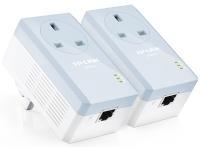
TP-Link TL-PA251KIT 200Mbps Pass-Thru PowerLine Adapter Kit overview
What This Product Does
TP-LINK's powerline adapter TL-PA251 takes advantage of your home's existing electric wires to transfer data while transferring power. That means, with no additional wiring required, users can simply plug the TL-PA251 into existing power sockets and establish networking infrastructure in a flash. With an additional integrated power socket, it solves a common powerline problem where power sockets would be blocked and thus unusable for other devices. Adopting a totally new product design, the TL-PA251 enables high data transfer rates of up to 200Mbps over a home's electrical circuit for up to 300 meters with an Auto Power-Saving Mode that reduces energy consumption by up to 75%.
Extra Power Socket for Additional Devices
With its Integrated Power Socket, the new TL-PA251 from TP-LINK provides real convenience for your home network. The integrated power socket allows an additional device or power bar to be connected to the adapter as though it were a normal wall socket. This ensures that even with the TL-PA251 plugged in, users won't need to worry about disconnecting their internet to get power for their other devices.
Mains Filter for Better Performance
With its Integrated Mains Filter, the TL-PA251 can optimize powerline communication performance by suppressing noise interference generated by surrounding electronic equipment that can affect network performance. That means that users won't experience a sudden speed drop when a larger power consuming device is plugged into the power socket.
Up to 200Mbps Speed Over 300 Meters
With advanced HomePlug AV technology, the TL-PA251 can provide users with a stable high-speed data transfer rate of up to 200Mbps over a home's electrical circuit for up to 300 meters. Together with the Built-in Qos and powerful 128-bit AES encryption, the TL-PA251 is perfect for users using bandwidth intensive applications involving work or play.
Reduces Power Consumption by Up to 75%
The TL-PA251, a new-generation of Powerline Adapter, with its practical product design and environment-conscious Power-Saving Mode, will automatically switch from its regular "Working Mode" to "Power-Saving Mode" that will reduce energy consumption by up to 75%.
"Pair" Button for Easy Network Security
Using the "Pair" button, adding a computer or network-compatible devices such as a printer, NAS hard drive or gaming console requires only three simple steps:
1. Plug the adapter into the power outlet,
2. Connect the device via the network cable to the adapter
3. Press the encryption buttons—and you're done.
128-bit AES encryption ensures that the network is safe and secure.
Support QoS for Advanced Multiple-media Optimization
Quality of Service (QoS) function prioritizes the bandwidth requirements of data traffic. Users can choose which type of traffic they will use -- Internet, Online Game, and Audio or Video, Voice over IP, and the QoS functions will guarantee clear, instant reproduction of that application, even when other applications are running on the network at the same time