CollectionCollection

View stock information at:


Chat online or Call us 023 9232 2500 Mon - Sat, 9am - 5pm

novatech novatech novatech novatech

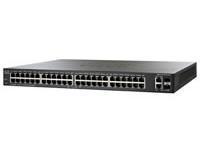
Cisco SF200-48P 48 Port Fast Ethernet Smart Switch with SFP and PoE

24 x 10/100 RJ45 Ports, 24 x 10/100 PoE RJ45 Ports, 2 x Combo SFP, Rack Mountable, Smart
£509.99 inc vat

Order Code: CIS-20048P

Manf.Code: SLM248PT

Buy Online

Ordered Upon Request Free Delivery
Quantity:

Collect @ Store

Please select a store

Quantity:

You may also like...

7 at Suppliers
£567.84 inc vat

Spend between £100 and £600 to get your goods before you pay

More information

Build a Powerful, Easy-to-Use Basic Business Network


The key to succeeding in today’s competitive business environment is investing resources wisely and getting the most value for your dollars. What if you could achieve business-class security and performance in your small business network without paying for advanced network features your network may not need? Now you can with Cisco 200 Series Smart Switches. When you need to share network resources and connect computers, printers, and servers, but low cost is a top priority, Cisco 200 Series switches provide the ideal solution.


The Business Network You Need, at an Affordable Price


The Cisco 200 Series is a portfolio of affordable smart switches that combine powerful network performance and reliability with the entrylevel managed switch features you need for a business network. These expandable Fast Ethernet or Gigabit Ethernet switches with up to 50 ports of connectivity provide basic management, security, and quality of service (QoS) at a great price. They speed file transfers, keep your vital business applications available, and help your employees respond more quickly to customers and each other.

Simplify Setup and Management


Cisco 200 Series switches are designed to be easy to configure, manage, and troubleshoot, allowing you to focus on your business priorities. Reduce the time it takes to deploy and manage your network with intuitive web-based interfaces. Speed setup with easy-to-use tools such as Cisco Discovery Protocol, FindIT, and Cisco Smartports, which let your network automatically detect and configure all connected Cisco devices. Simplify your business by addressing all communication andconnectivity needs with a single powerful Ethernet network that has been pretested to integrate with other small business technology products.

Gain Enhanced Features at the Right Price


Cisco 200 Series switches offer essential Layer 2 switch features at a much lower price than advanced managed switches. Simplify the deployment of voice, wireless, and video surveillance systems with automated QoS and voice VLAN features, and optional Power over Ethernet (PoE) connectivity. Meet all of your connectivity needs with more ports per Gigabit switch than other models on the market and expandable fiber-optic or Gigabit Ethernet uplink connectivity options. Prepare to meet tomorrow’s business needs with native support for IPv6, which lets you take advantage of the latest networking applications and operating systems without having to upgrade your network. Reduce power consumption with “green” switches that employ power-efficient microprocessors and quiet, fanless operation in many models.

Protect Your Business Investment


Cisco 200 Series switches offer the reliable performance, investment protection, and peace of mind you expect from a Cisco switch. Safeguard your investment with a limited lifetime warranty and a solution that has been tested to deliver the performance your business demands. Solve technical problems right away with expert phone support through the Cisco Small Business Support Center and extensive online tools.

A Powerful Foundation for the Basic Business Network


Cisco 200 Series Smart Switches help you build a business-class network for an affordable price. They provide just the right security, management, and QoS features you need to make the most of your business applications and productivity tools, without the costs or complexity of a managed switch. With the Cisco 200 Series switches, you can rest assured that your business applications and communication tools are resting on a strong technology foundation, so you can focus on achieving your business goals. To learn more, visit www.cisco.com/go/200switches.
Interface Specifications

Ports 24 x 10/100 RJ45 Fast Ethernet
24 x 10/100 RJ45 Fast Ethernet with PoE
2 x Gigabit Combo (RJ45 + SFP)
LEDs System, Link/Activity, Speed
Standards IEEE 802.3 10BASE-T Ethernet, IEEE 802.3u 100BASE-TX Fast Ethernet, IEEE 802.3ab 1000BASE-T Gigabit Ethernet, IEEE 802.3ad LACP, IEEE 802.3z Gigabit Ethernet, IEEE 802.3x Flow Control, IEEE 802.1D (STP), IEEE 802.1Q/p VLAN, IEEE 802.1w RSTP, IEEE 802.1X Port Access Authentication, IEEE 802.3af, RFC 768, RFC 783, RFC 791, RFC 792, RFC 793, RFC 813, RFC 879, RFC 896, RFC 826, RFC 854, RFC 855, RFC 856, RFC 858, RFC 894, RFC 919, RFC 922, RFC 920, RFC 950, RFC 951, RFC 1042, RFC 1071, RFC 1123, RFC 1141, RFC 1155, RFC 1350, RFC 1533, RFC 1541, RFC 1542, RFC 1624, RFC 1700, RFC 1867, RFC 2030, RFC 2616, RFC 2131, RFC 2132, RFC 3164, RFC 2618

Performance Specification
Switching Capacity 13.6 Gbps
Forwarding Capacity 10.12 mpps (million packets per second)
Jumbo Frames Frame sizes up to 10 KB supported on 10/100 and Gigabit interfaces(9K for SG200-08 and SG200-08P)
MAC table Up to 8000 MAC addresses

Layer 2 Specification
Spanning Tree Protocol (STP) Standard 802.1d STP support
Fast convergence using 802.1w
Port Grouping Support for IEEE 802.3ad Link Aggregation Control Protocol (LACP)
Up to 8 groups
Up to 4 ports per group with 16 candidate ports for each (dynamic) 802.3ad link aggregation
VLAN Support for up to 128 VLANs simultaneously (out of 4096 VLAN IDs)
16 VLANs supported in SG200-08 and SG200-08P.
Port-based and 802.1Q tag-based VLANs
Voice VLAN Voice traffic is automatically assigned to a voice-specific VLAN and treated with appropriate levels of QoS
Head-of-line (HOL) blocking HOL blocking prevention
IGMP IGMP limits bandwidth-intensive multicast traffic to only the requesters; supports 256 multicast groups

Security Specification
IEEE 802.1X 802.1X: RADIUS authentication and accounting, MD5 hash
Port Security Locks MAC addresses to ports, and limits the number of learned MAC addresses
Storm Control Broadcast, multicast, and unknown unicast

Quality of Service
Priority levels 4 hardware queues
Scheduling Strict priority and weighted round-robin (WRR)
Queue assignment based on differentiated services code point (DSCP) and class of service (802.1p/CoS)
Class of Service Port based
802.1p VLAN priority based
IPv4/v6 IP precedence/type of service (ToS)/DSCP based
Differentiated Services (DiffServ)
Rate Limiting Ingress policer, per VLAN and per port

IPv6 Specification
IPv6 IPv6 host mode
IPv6 over Ethernet
Dual IPv6/IPv4 stack
IPv6 neighbor and router discovery (ND)
IPv6 stateless address auto-configuration
Path maximum transmission unit (MTU) discovery
Duplicate address detection (DAD)
Internet Control Message Protocol (ICMP) version 6
IPv6 over IPv4 network with Intra-Site Automatic Tunnel Addressing Protocol (ISATAP) support
IPv6 QoS Prioritize IPv6 packets in hardware
MLD Snooping Deliver IPv6 multicast packets only to the required receivers
IPv6 applications Web
ping
Simple Network Time Protocol (SNTP)
Trivial File Transfer Protocol (TFTP)
RADIUS
syslog
DNS client
IPv6 RFCs supported RFC 2463: ICMP version 6
RFC 3513: IPv6 address architecture
RFC 4291: IPv6 addressing architecture
RFC 2460: IPv6 specification
RFC 2461: Neighbor discovery for IPv6
RFC 2462: IPv6 stateless address auto-configuration
RFC 1981: Path maximum transmission unit (MTU) discovery
RFC 4007: IPv6 scoped address architecture
RFC 3484: Default address selection mechanism
RFC 4214: ISATAP tunneling
RFC 4293: MIB IPv6: Textual conventions and general group
RFC 3595: Textual conventions for IPv6 flow label

Switch Management
Web user interface Built-in switch configuration utility for easy browser-based device configuration (HTTP). Supports configuration, system dashboard, system maintenance, and monitoring
Remote Monitoring (RMON) Embedded RMON software agent supports one RMON group (statistics) for enhanced traffic management, monitoring, and analysis
IPv4 and IPv6 dual stack Coexistence of both protocol stacks to ease migration
Firmware upgrade Web browser upgrade (HTTP) and TFTP
Port mirroring Traffic on a port can be mirrored to another port for analysis with a network analyzer or RMON probe. Up to 4 source ports can be mirrored to one destination port. A single session is supported.
VLAN mirroring Traffic from a VLAN can be mirrored to a port for analysis with a network analyzer or RMON probe. Up to 4 source VLANs can be mirrored to one destination port. A single session is supported.
DHCP (Options 66 and 67) Dynamic Host Configuration Protocol (DHCP) options facilitate tighter control from a central point (DHCP server) to obtain IP address, auto-configuration (with configuration file download)
Text-editable config files Config files can be edited with a text editor and downloaded to another switch, facilitating easier mass deployment
Smartports Simplified configuration of QoS and security capabilities
Cloud services Support for FindIT Network Discovery Utility
Localization Localization of GUI and documentation into multiple languages
Other Management HTTP, RADIUS, port mirroring, TFTP upgrade, DHCP client, BOOTP, SNTP, ping, syslog

Power Over Ethernet
Ports Supported 24
Power Dedicated to Ports 180W

Physical Specifications
Dimensions 440.6 x 44 x 350 mm
Form Factor Rackmount
Weight 4.73 kg
Power 100V-240V, 50V/3.6A, 12V/4A, 50-60 HZ
Certifications UL (UL 60950)
CSA (CSA 22.2)
CE mark
FCC Part 15 (CFR 47) Class A
Warranty Limited Lifetime (see www.cisco.com/go/warranty)

For full detailed specification please visit Cisco 200 Series Switches Data Sheet

Why not Tell A Friend about this product, all you need to do is fill out their information below and click send.

Your Name

Your Email

Friends Name

Friends Email

Personal Message

Reviews

This product currently has no reviews, if you own this product why not write one yourself?

Customer Reviews | Submit A Review

We love having your feedback on all of your products, we do ask that you keep your reviews strictly about the product though. If you have any feedback about the service from the company please contact ourCustomer Servicesteam. Thank you.

Name

Email

Location

Rating

Review
